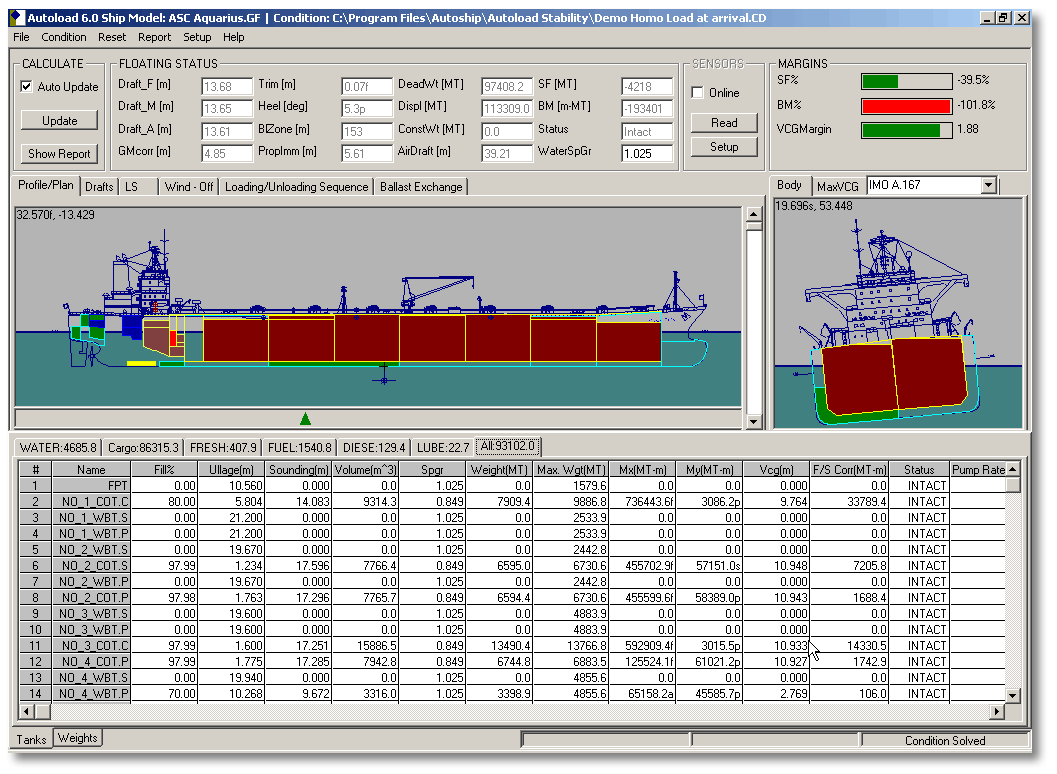
Have you ever imagined our life on board without loadicator?
While some intellectuals might find it of no difference to live without it, most of us can imagine how difficult it will be to calculate trims, drafts etc manually.
And most difficult part (rather an impossible one) will be to calculate Shear forces (SF) & bending moments (BM) manually.
So while most of us agree that loadicator has made our life onboard (Definitely the chief officer’s) simple, are we using our loadictor to only calculate drafts, trims and stability?
There are many other things that we can use loadicator for. This post will highlight at least five of these things you can do with loadicator.
But before you do anything with loadicator, it is important to ensure that loadicator complies with the testing and carriage requirements.
Assuming your loadicator complies with all requirements, Let us take a recap of what we generally do with Loadicator.
Usual things everyone does on Loadicator
The first thing we do on receiving the voyage instructions is planning the stowage.
And the first thing we keep our eyes on while planning the stowage on loadicator is trim and list.
Loadicator provides information on the trim and list that the vessel will have in a particular stage of the stowage.
Other than trim and list, we also ensure that shear forces and bending moments does not exceed the safe limits.
Loadicators give the SF and BM values as the percentage of allowed limit. Ship staff is expected to keep it to the minimum but in any case less than 100% of the allowed limits.
Even keeping the SF & BM closer to but less than 100% over a longer period & multiple voyages can have the cracks developing in the ship’s structure.
And for this reason, we should always do our best to keep these values to the minimum. Loadicator off course help us to find these values with few clicks.
Vessels are also required to comply with the intact stability requirement as per SOLAS. Again Loadicator helps us to get values to judge if we comply with these requirements.
Ships are also required to comply with damage stability criteria by different regulations.
For example, chemical tankers are required to comply with damage stability criteria by IBC code (International code of carriage of chemicals in Bulk).
Similarly, oil tankers are required to comply with damage stability criteria by Marpol & gas tankers by IGC code.
Until now it was not a requirement for ship’s loadicators to have the capability of calculating damage stability. But Marpol, IBC code, and IGC code was amended by Res MEPC 248(66), Res MSC.369 (93) and Res MSC.370 (93) respectively. First special survey after 01 Jan 2016, all tankers need to have loadicator that can calculate damage stability.
But even before this requirement, many ships were provided with the loadicators that could calculate the compliance with damage stability requirements.
Additional tasks that can be performed on Loadicator
Apart from the usual task that we perform on loadicator, there are some other tasks which can come very handy.
1. Online Loading or unloading rate
If your loadicator is online, you can also get live loading or discharging rate from individual tanks and as total rate. This information can be very handy when you are loading in more than one tank.
If you need to receive the cargo in these tanks equally, this function of loadicator can be used. Similarly, if you need to receive lesser cargo in one or few tanks, again this information comes handy.
If you are correcting list during loading or discharging, looking at the live rate can give you a fair indication of the effectiveness of your actions.
This rate in loadicator is calculated as an average over a particular time.
Say if the time for calculating average is set to 10 minutes, loadicator will calculate the difference in cargo quantity for last 10 minutes and average it for one hour to give you loading or discharge rate.
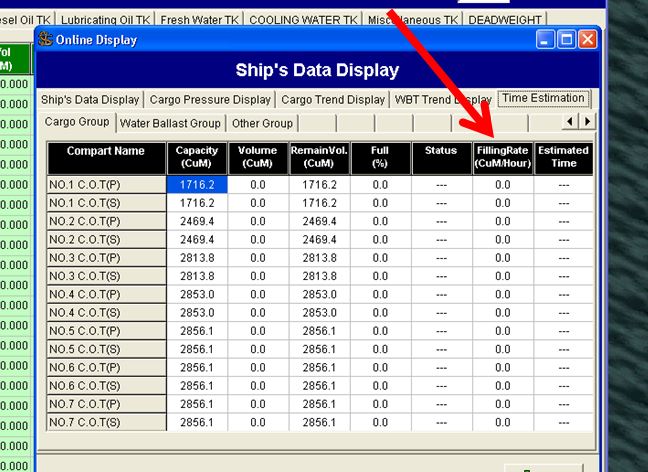
In some loadicators, you can change these timings as per your requirement. If provided, you must take advantage of this function. Here is how?
If you are looking for average loading rate for last say one hour or two hours, you should set the time for one or two hours.
But if you want the current loading rate, the time should be set to 5 to 10 minutes. You would ask why 5 to 10 minutes and why not 1 minute or 1 hour?
If you set the time too less, any small fluctuation will give you wrong loading rate. Also, your loading rate will fluctuate all the time.
If you set the time too high, you will get the average rate for that time but that might not be the present rate. For example, if you have set the time to 1 Hour, and you stopped the cargo for 10 minutes. You would still get a rate averaged for last 1 hour which will not be your present rate.
2. Calculating constants with loadicator
Have you ever heard someone say, “drafts on this loadicator shows 10 cms less on aft and 20 cms more on forward”? I am sure you must have.
These may sometimes be fixed errors, but many times these errors are variable with different loading conditions. The only solution to it is to accurately enter constants in loadicator.
Accurate constants don’t only means accurate weights but also the longitudinal (LCG) and vertical (VCG) position of the constants.
Calculating the constants manually isn’t a rocket science but is still a tedious process. Some of the loadicator has this functionality inbuilt.
Here is how constants in loadicator are calculated.
First, you need to enter all known weights such as cargo, bunkers, ballast, lube oil, fresh water etc in the loadicator. Make the constants zero in the loadicator.
Then go to constants calculation section of the lodicator and enter actual drafts ( six drafts, FWD port & stbd, Aft port & stbd and midship Port & stbd) as accurately as possible.
These drafts need to be visual drafts. If you cannot visually check six drafts, it is important to check at least three drafts on one side and midship draft on the other side. Ensure list is absolutely zero and enter the other drafts accordingly.
Next enter the seawater density. You need to physically measure the density of the dock water by collecting the water sample. This is very important. If you are conversant with the draft survey calculations you know how a slight change in density can offset the value of your constants by a larger margin.
While taking the sample of dock water, you should take the sample from mid of the seawater depth.
After entering all the values, click on calculate constants, and whoop. Loadicator calculates weight as well as location (LCG and VCG) of constants you should enter in the loadicator.
No more errors in the loadicator drafts. What you get on loadicator is what you will have in actual.
3. Shifting weights to get desired trim, list or draft
This function of Loadicator would be useful if we need following
- If we need to reduce/increase trim from present condition
- If we need to bring the ship to upright condition by shifting cargo or ballast
- If we need to reduce aft draft to certain level
As you know these are very common situations chief officer & Master find themselves in. And then we shift the weights arbitrarily to bring the ship to the desired condition.
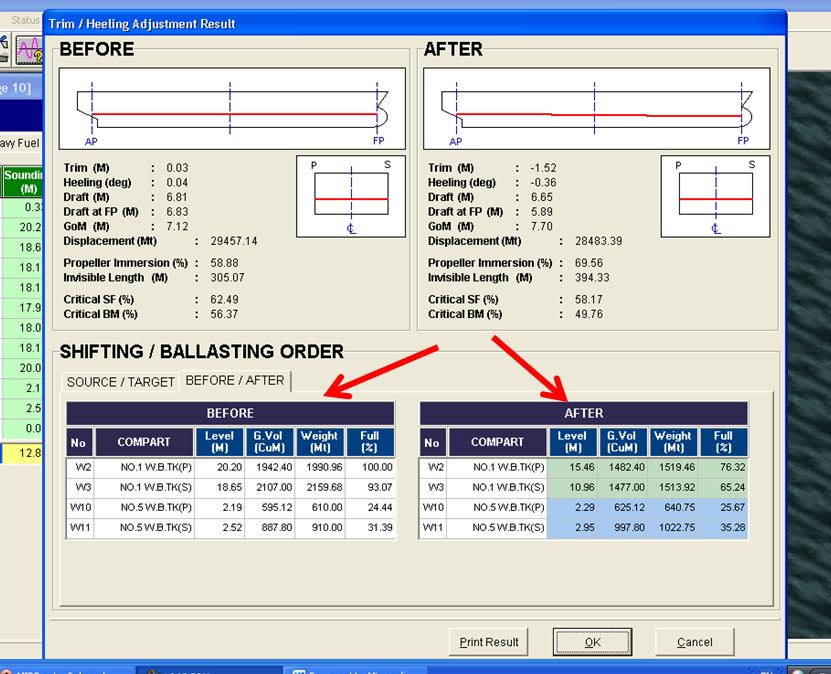
But most of the loadicators have this function where you can set the desired condition (Like list to be zero or trim to be 1.5 m or both and choose the tanks from where the weights can be adjusted. Rest will be done by the loadicator. It will give you the final weights these tanks should have to bring the ship to the desirable condition.
For example, like on this loadicator, you need to go to “Trim/heeling adjustment” from the main menu
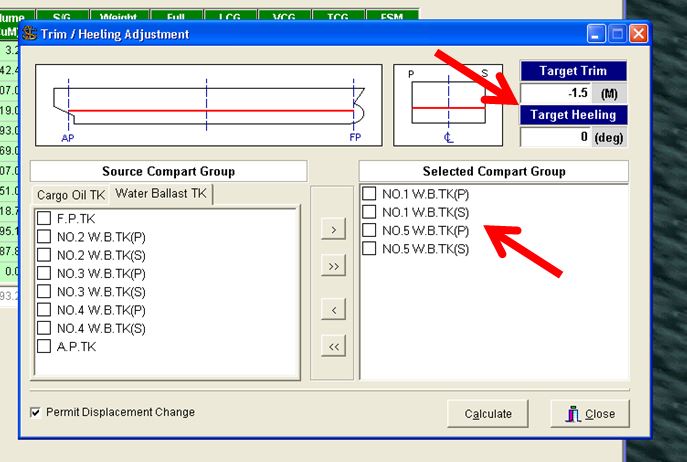
You can set the desired trim or list and choose the tanks which you want to switch weights. After choosing all this, you click on calculate
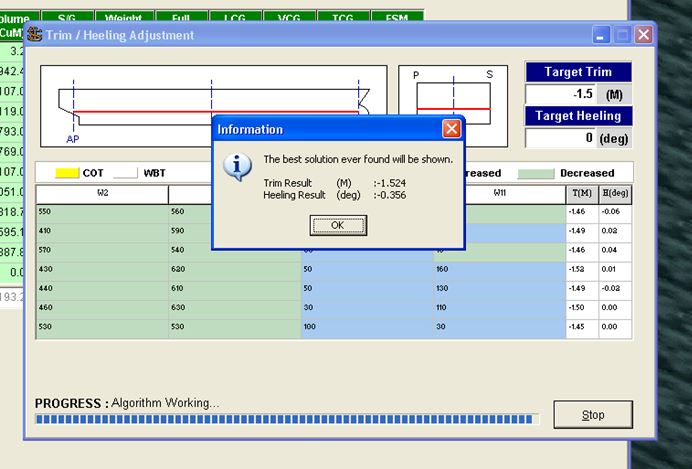
It will calculate the weight to transfer and will give you before/after summary of these tanks to get your desired results.
4. Replacing ullage tables with Loadicator
Did you know with some loadicators, you don’t need to look at those ullage tables anymore ? You just enter the ullage of a particular tank in the loadicator and it will give you volume that will match with your ullage table.
While all loadicators can give volumes for ullages, but not all matches with the ullage tables. The reason can be any of the following
1) Some loadicators do not correct the ullage for the trim and list. These loadicators give the volume at zero trim and zero list. If the ship has trim during final calculation, you have to use ullage tables for volumes.
There are very few loadicators which can correct the volumes for trim and list. But there are many ships where there is no trim & list correction to the volume or ullage.
These are the ships which have the ullage port located at the center of the tank.
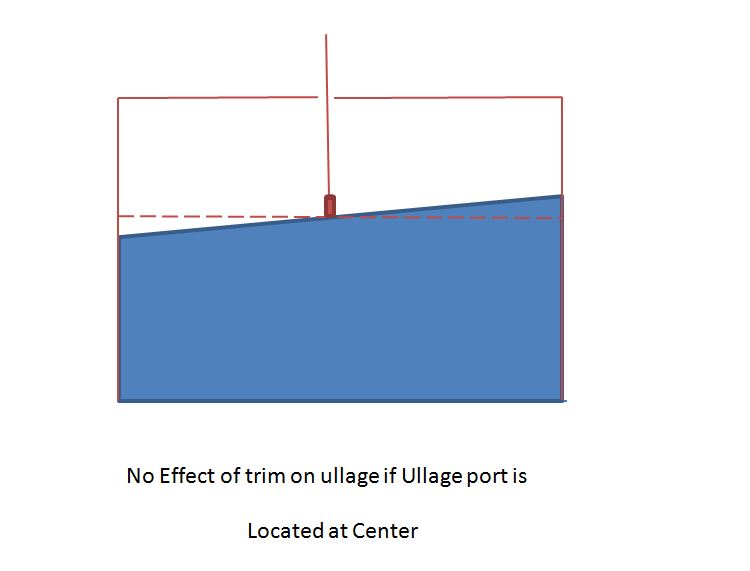
For example, see the image above. As you can see if the ullage port is located at the center of the tank, there is no change in the ullage with a change in trim. On these ships, you can directly take the ullage from the loadicator.
Even if your loadicator doesn’t correct the ullages for trim and list to give volume, it is still possible that volumes from loadicator and ullage table match. This is when in ullage tables, trim correction is applied on the ullage and not on the volume.
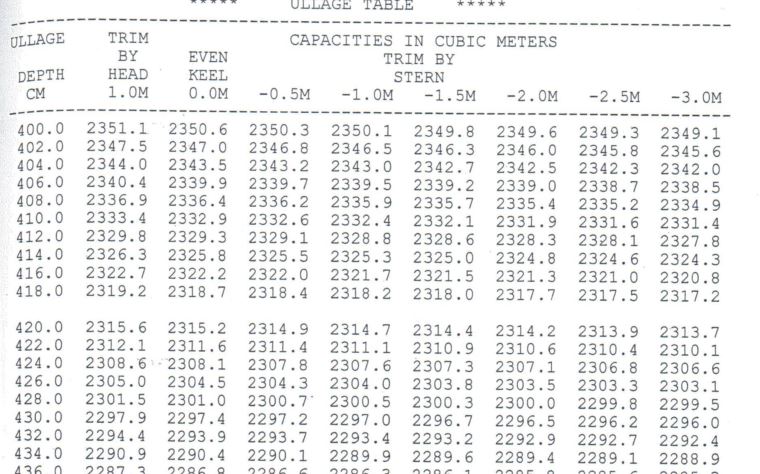
For example, if we look at ullage table in the image above, trim correction is applied to the volumes. So say for 4-meter ullage with 1-meter stern trim, ullage table will have the volume 2350.1 m3. But loadicator will show the volume as 2350.6 m3. So in this example, you cannot take volumes from loadicator for the final calculations.
2) The difference in volumes for same ullage in loadicator and ullage table can also be because of different reference point.The loadicator and ullage tables may be based upon different reference points for measurement.
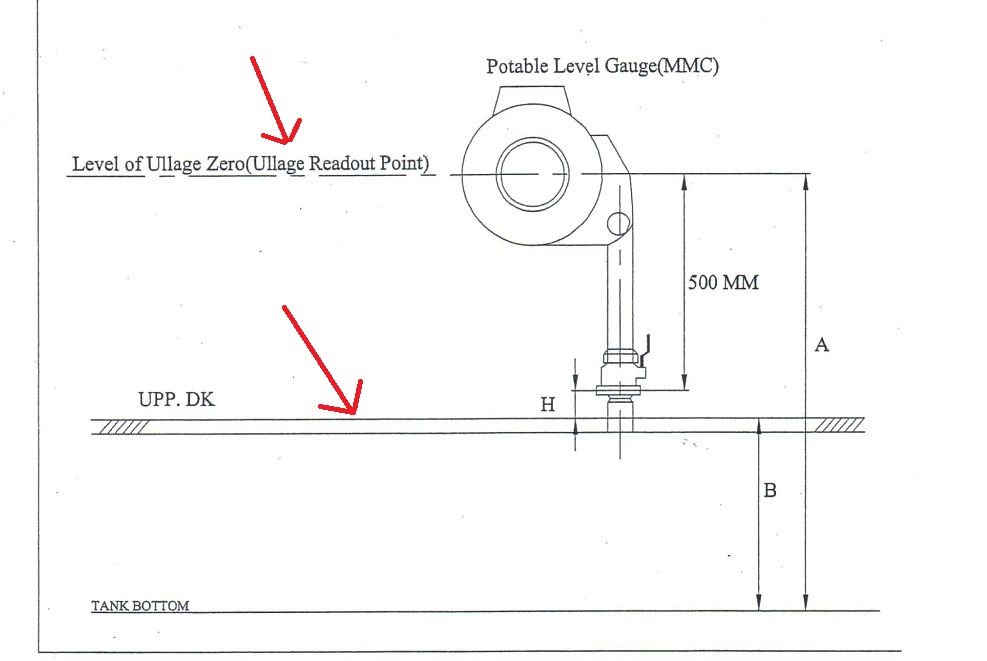
For example, see the image above. You will usually find this kind of image on the front few pages of your ullage table.
The image is from actual ullage table of a ship. And as you can see the reference for reading ullage in this ullage tables is the MMC (or UTI) read out point. But your loadicator might be measuring the ullage from either the tank top (height B) or from vapor lock (height B+H).
If that is the case, you cannot take volume from the loadicator for the ullages taken by UTI or MMC.
5. Wedge calculation
Wedge calculation is done to calculate the volume of the cargo when cargo does not extend to the entire surface of the tank.
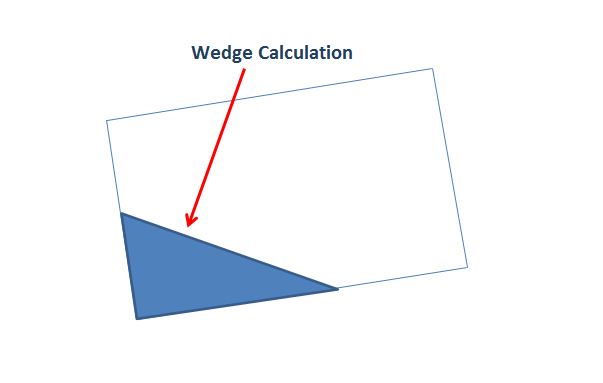
There is a considerable amount of calculation to calculate the volume by wedge formula. But imagine if this can be automatically calculated by loadicator.
Many loadicator especially on crude oil tankers can calculate the volume by wedge formula.
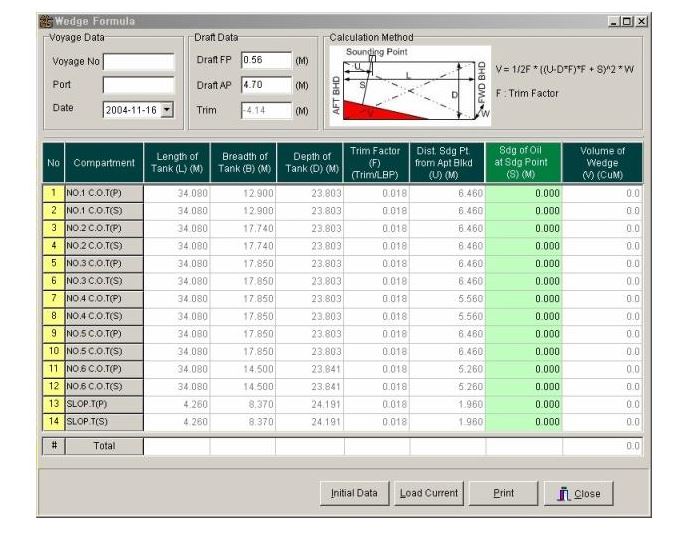
For example, see the image of a loadicator screen. In this, you just need to enter the variables and it will give you the volume of each tank calculated by the wedge formula.
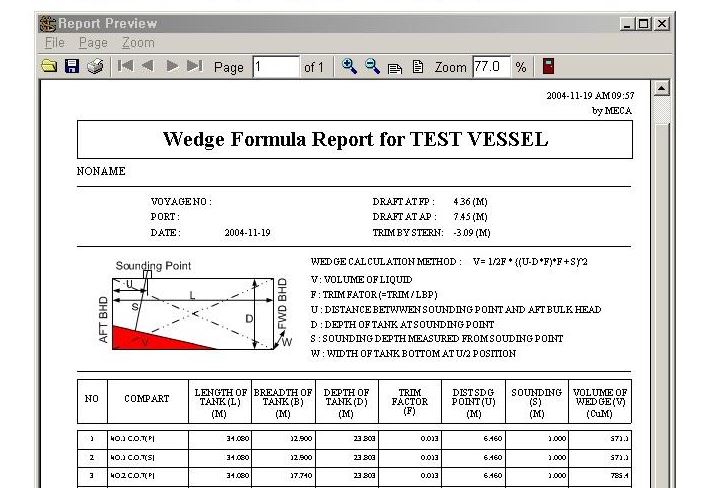
You can even get the wedge calculation sheet which you can save or print.
Conclusion
Loadicator has become an important instrument onboard. Gone are the days of manually calculating compliance data related to cargo operation.
But most of the loadicators are designed to provide many functions, which are not otherwise required as per legislations. Knowing and using these functions can ease the life during cargo operations to a certain extent.
There are hundreds of approved makers for loading computer software. Each of these offers something unique apart from the basic functions. Knowledge of these add ons and using these can really ease life during cargo operations to a certain extent.
Do you know any other add on functions that your loading computer offer?