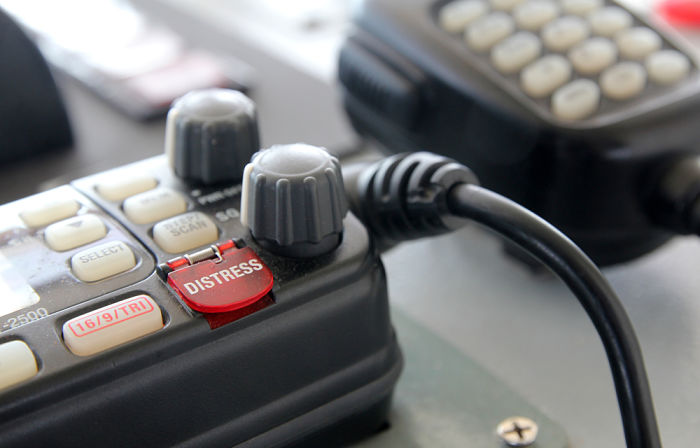
Raise your hand if you think NBDP is more ignored equipment of GMDSS system.
If I was with a group of deck officers right now, I am sure I would see many hands raised. NBDP is surely an ignored equipment.
But it is ignored because NBDP is a dead horse, hardly used and gathering dust at one corner of the bridge.
Even only few coast stations these days have the NBDP facility.
All agreed but if we have this equipment on board, we must know about it. That remains the logic for all the equipments on board.
So in this post, I will go through all that one may have to know about NBDP.
Let’s start.
What is NBDP ?
In simple terms, NBDP (Narrow Band Direct Printing) is a telex. A way to communicate with text rather than by voice.
It is said that NBDP was introduced in the GMDSS to help seafarers whose first language was not English. They did not have to speak to broadcast their distress message, instead they could type and send.
If we go by the literal meaning of the NBDP, then we can understand that
- It uses narrow band width for transmitting the message and
- When a message is received, it prints the message on the screen and on the printer connected with NBDP
So what can NBDP do..
- NBDP can send and receive text messages with to and from a single station
- NBDP can transmit text message stored in the equipment (SD card or floppy)
- NBDP can broadcast a message to all the stations that have their NBDP tuned in to the frequency on which message is transmitted
You can easily draw an analogy between NBDP and whatsapp or viber.
Is NBDP really required on board ?
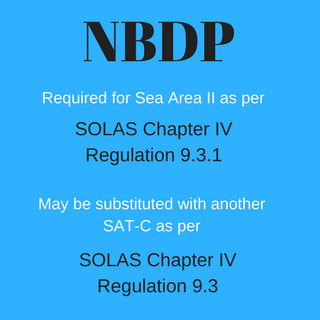
NBDP is required for sea area A2 as per SOLAS chapter IV, regulation 9.3.1
But if you had noticed, on some ships you will find that there is no NBDP.
This is because as per SOLAS chapter IV, regulation 9.3, the requirement of having NBDP can be fulfilled by providing an additional Inmarsat ship earth station.
So on the ships with no NBDP, you may find additional Sat-C terminal.
What is ARQ and FEC mode ?
If you wish to know about NBDP, you must know about ARQ and FEC.
These are two modes of transmission for NBDP.
ARQ Mode
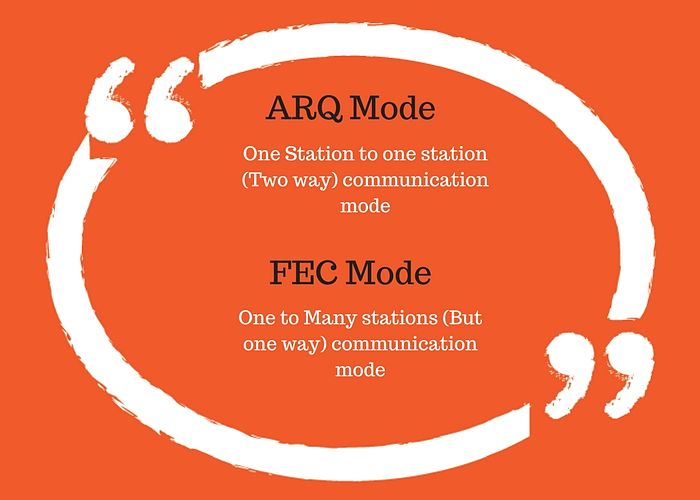
ARQ mode is used for one to one communication. For example when our ship wish to communicate with a specific ship or coast station.
With ARQ,
- you send an information (text) when you are transmitting station
- You press Over key (F9) and you become receiving station. You now can read the message what other station is sending
- When other station presses “Over”, you again become the transmitting station and this process goes on.
FEC Mode
FEC (Forward error correction) mode is for one station to one or many stations type of communication. This mode is used for broadcasting the message. For example if a ship need to broadcast a distress telex message, FEC mode should be used.
Unlike ARQ mode, FEC is only one way. That is, with FEC we can transmit our message and then end the communication.
With FEC mode
- You send the information you wish to send
- Once the information is sent, you disconnect the connection
- You cannot switch between transmission and receiving mode
So if you want to communicate with other station, you need to choose ARQ mode. But if you just want to transmit your message, you can choose FEC mode.
So when transmitting a distress message to all station through NBDP, you must use FEC mode
Options on NBDP screen and what these mean ?
A NBDP screen typically looks like this.
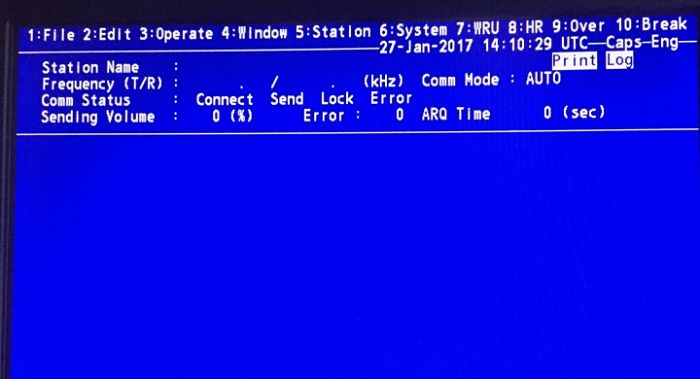
The options you see on top of the screen are accessed by function keys. I see sometimes the keyboard functions keys marked with these options for ease of use. Even if it is not there, we can always mark it like this.
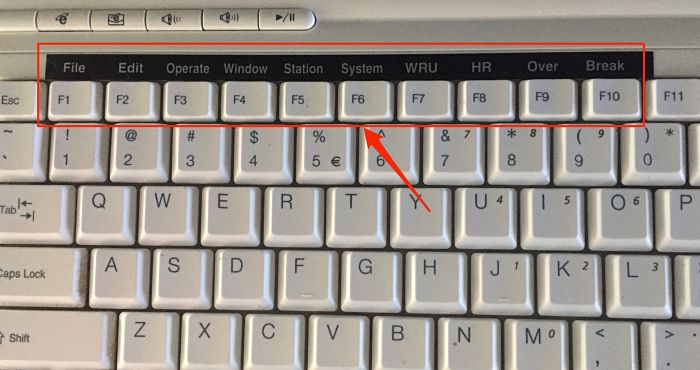
Lets see what each of these functions are for
WRU, HR and OVER keys
The literal meaning of the first two terms is
WRU (Function Key F7): who are you ?
HR (Function Key F8): Here is…
This is the way identity is exchanged between the stations interacting with each other.
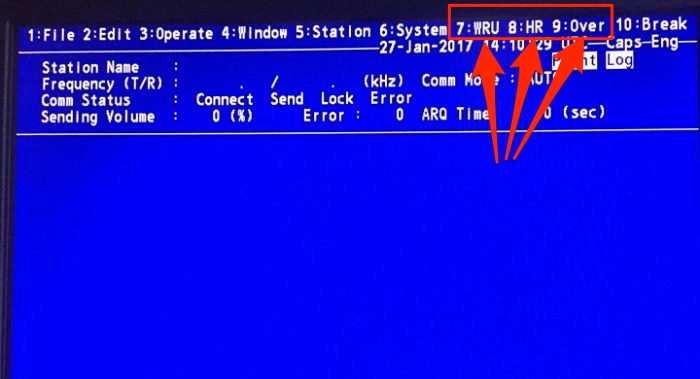
When you are connected with a station and before you start transmitting any telex message, you need to press these two keys.
This will send your identity and ask for the identity of another station.
Logically this is similar to how we start any communication. For example, during R/T communication we pronounce the ships name and call sign.
The Over (Function key F9) is used to switch the direction of traffic. The information sending station becomes the information receiving station and vice versa. As two way communication is only possible in ARQ mode, Over key is used when communicating in ARQ mode.
One station finishes his message, presses “over” and then waits for receiving the message of other station.
The function of this key is similar to saying “over” over walkie talkie after we finish our message.
GA+?
This is the code that you will see when communicating through NBDP. The meaning of this code is “Go ahead”.
When you see this code on you screen, this means that now you are the transmission station and you are ready to send your message. Again this code will appear in ARQ mode.
Methods of sending message
On NBDP, we can either
- Send a message file stored in floppy or SD card of the NBDP or
- Manually type the message on the keyboard.
In ARQ mode, when you are the transmitting station, you can just start to type the message and it will be received by other station as you type.
Or you can choose the file to send and it will be transmitted to the receiving station.
To choose the file on Furuno NBDP, after exchanging the answer back (WRU, HR)
- Press the function key F3 then 3 key to open the [File to Send] window
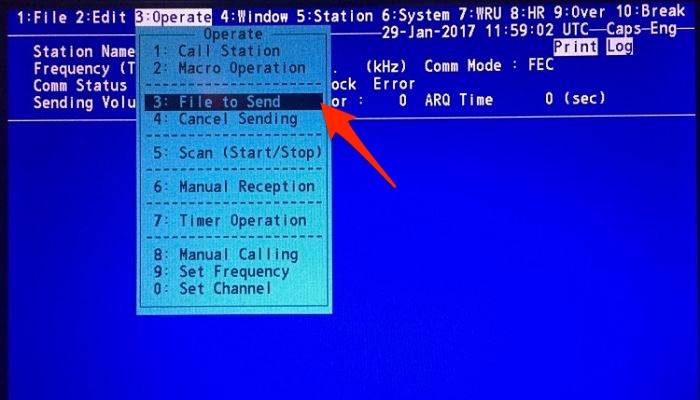
- Choose the file to send from the list by pressing up/down arrow
- Press enter to send the file
How to send / Receive a routine message on NBDP ?
Now that we know something about NBDP, let us discuss how we can send a routine message to another ship on NBDP.
I will show this on Furuno GMDSS station.
First thing is to know the MMSI number of the other ship and agree on the working frequency.
To communicate with another ship, both your station and station of other ship need to be on same frequency and NBDP station should be active.
To make the connection with other ship station (on Furuno equipment).
Press the function key F3 to open operate menu and set the working frequency by choosing option 9.
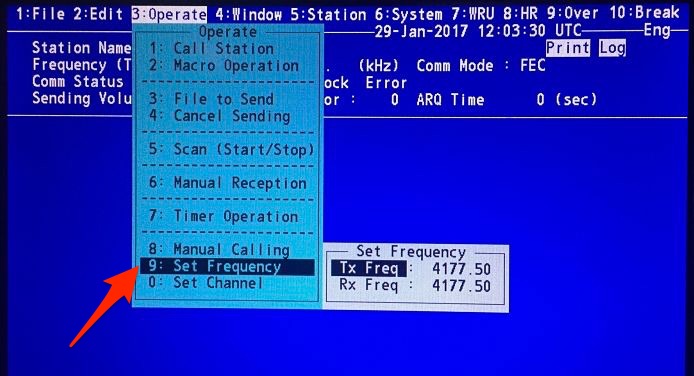
After operating frequency is set, press function key F3 (Operate) and choose “manual calling” option
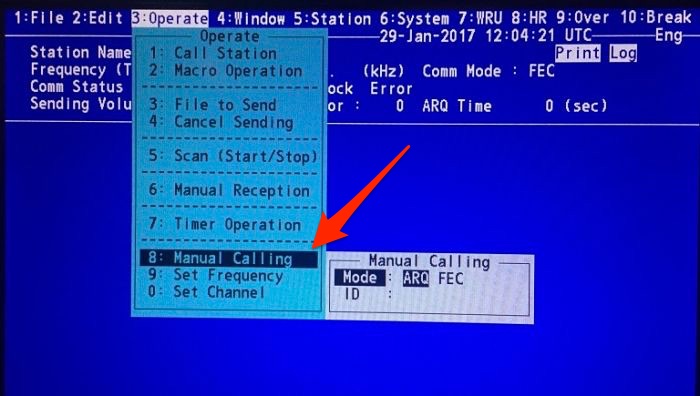
Select the ARQ mode (remember for one to one communication we have to use ARQ mode) and then input the ship’s MMSI number in the ID.
Press enter. After you hit “Enter” one of these two message will appear. It will either show
- Channel busy check, if the frequency is busy. or
- Connect Send Lock, if the frequency is open for communication
Now if “Connect send Lock” is highlighted on screen, you are all done to communicate with the other ship.
When you are connected with the other station, it will show the station’s ID and frequency you are communicating on.
Exchange answer back by pressing F7 (WRU) and then F8 (HR) keys and start communicating.
As I said earlier, when you are done with sending your message, press F9 (over) key to switch the transmission to other ship.
When you see GA+? on your screen, it mean that the other station has switched the transmission to you and you can again start to transmit your message.
To end the conversation
- Exchange the answer back by pressing F7(WRU) and F8 (HR) keys
- After exchange of answer back, press F10 (End) key to disconnect the line.
How to transmit a distress message on NBDP ?
Usual way of GMDSS distress communication is
- Send the DSC alert to all ships and coast station on an appropriate distress DSC frequency
- Switch to corresponding Radio Telephony (RT) frequency and broadcast your distress message starting with Mayday Mayday Mayday
Now when we have transmitted the DSC alert, how a ship receiving it know where they can listen to your distress call ?
This information is right there in the DSC alert message. In the DSC alert message that a ship sends, it need to mention
First is the Mode of communication it will broadcast its message. That is if the message will be broadcasted on RT or NBDP. J3E is the code for RT communication and F1B is for NBDP.
Second, the frequency on which the receivers need to switch on. The frequency will be the corresponding frequency on which DSC alert is received.
So now if you want to communicate the distress message on NBDP, first step will be to let that know to ships and coast stations who would receive your DSC alert by choosing the Telecommand as “F1B”
After you have sent the DSC alert, switch to NBDP corresponding frequency.
To transmit your Mayday message,
- You can either type and save the Mayday message in floppy drive or SD card of NBDP, or
- You can type directly while transmitting your message
Either way, you have to follow these steps.
Press Function key F3 and select manual call.
Choose the FEC option. Remember for broadcasting to all the parties we cannot use ARQ mode which is for one to one communication.
Leave the station ID as blank. This is to be entered only if we are sending the message to a particular station.
Press enter. If the frequency is clear, you will see Connect Send as highlighted.
Now you are ready to either send your message by input to the keyboard or by choosing a pre-typed file.
To Send the stored message, press function key F3 and then select “File to send” option.
Press enter and your file will be transmitted.
How to receive a distress communication on NBDP ?
When you receive a distress DSC alert. Check if the telecommand is J3E or F1B. If it is F1B, you need to be on NBDP to receive the distress message.
To receive the distress message on NBDP, switch to NBDP frequency corresponding to the frequency on which DSC alert was received.
Press the function key F3 and choose “Manual Reception”.
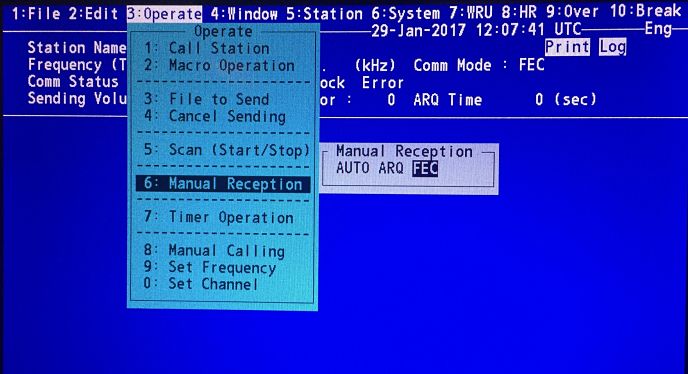
Select FEC mode and press enter key. When a call is detected, Lock will get highlighted.
When the line is connected, [Connect] is highlighted.
When the receiving the message is complete, the NBDP connection will automatically cancel.
The received message will be stored in the Floppy (or SD card) of the NBDP.
NBDP Test procedures
Now that we know how to operate NBDP, testing of NBDP should not be an issue.
Actually NBDP does not require much of the testing. There is a self test in the equipment that should be done as per the maker guidelines.
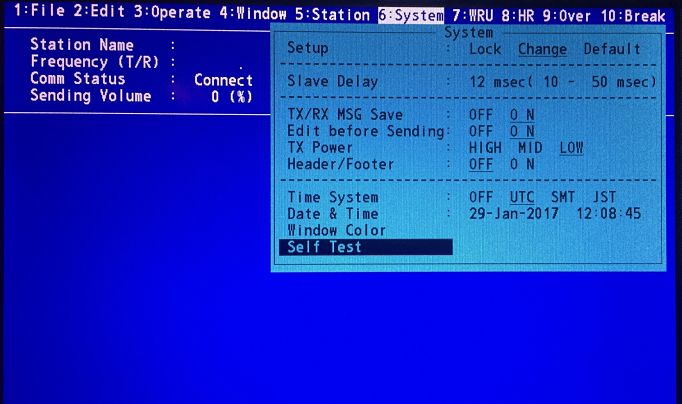
Apart from that, it is a good practice to communicate with another ship at least monthly and keep the records.
Conclusion
NBDP is hardly put in use onboard ships. Many ship owners are now preferring to have another set of Sat-C on board rather than having NBDP fitted on board.
In spite of all that, if we have NBDP on board, we must know about how to operate it. After all if it is on board, it is very much a part of GMDSS station.