There were days when only radio officers operated radio equipments. Deck officers had nothing to do with the radio equipments. With GMDSS equipments all deck officers are radio officers now.
With this new responsibility, came new challenges. Deck officers have since tried their best to fill the gap of radio officer and they have done pretty good.
But there are always few things we never find in book. We call these things “practical experiences”. Many of these were lost with the radio officers but not all.
Deck officers now need to know everything about how to make best use of GMDSS equipment. But GMDSS equipments are of no use, if these wont work when required.
There are many functional requirements of GMDSS equipments. We can only be sure if these will perform or not by testing these at regular interval. Each GMDSS equipment has a testing interval and procedure to test.
Familiarity with the GMDSS equipments is also essential to avoid PSC detentions.
In this post I try to solve this problem with testing of MF/HF equipment and what to do if test fails.
Lets Begin
MF/HF equipment
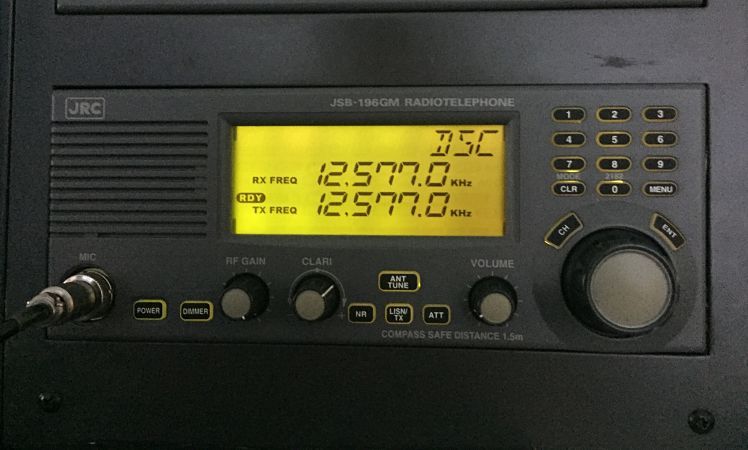
MF/HF equipment is for sending distress alerts over long range. We need to test MF/HF equipement to be sure of its functionality. Lets see what all test we need to do on MF/HF equipment.
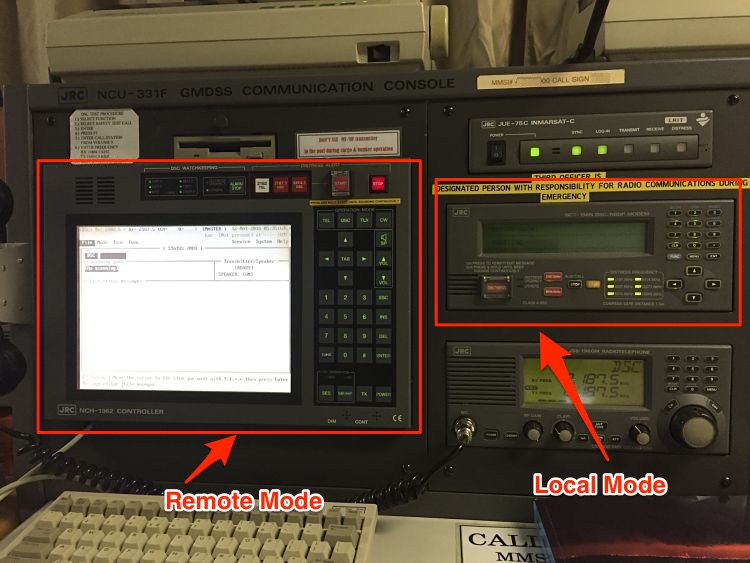
I will show this on JRC equipment MCU-331F. If you have worked on this system, it has a remote mode and local mode. The options to select the tests can be accessed from both modes.
1. Daily Test
Depending upon the equipment make, we need to do few of the daily tests on MF/HF. Whatever the equipment, the test generally involves
- checking of internal connections (called Modem Loop test),
- checking printer and
- checking display of MF/HF equipment
Besides some makers may have few other daily tests specific to the equipment. Lets see how each of these daily tests are done.
Modem Loop test
What does a successful loop test signify ? If the modem loop test is OK, it means that on receiving a message on MF/HF, it would definitely be processed by the equipment. In other words, it means that received message will not be lost in the loop of the equipment.
In the modem loop test, the equipment send and receives a message internally. If all the loops of the equipment are OK, the message will be transmitted and received without any trouble.
To Perform a Modem loop test on JRC equipment
From Local Mode
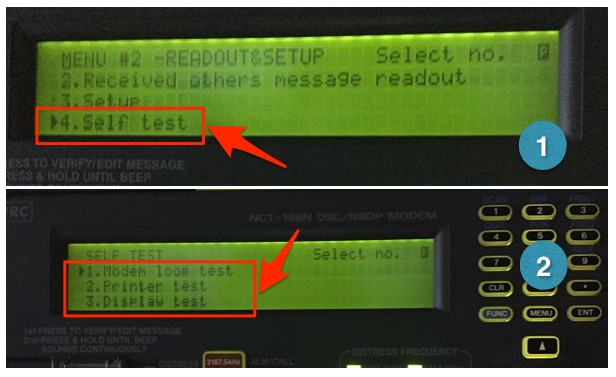
Go to Menu#2 -> READOUT & SET UP -> press 4 -> press ENT. This displays the “SELF TEST” screen. Select the “Modem Loop test” and press ENT. Menu#2 is accessed by pressing “Menu” twice.
From Remote mode
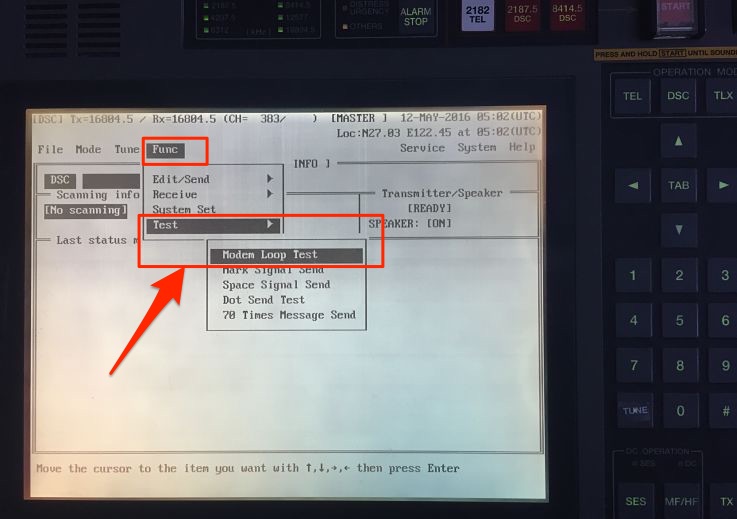
Go to FUNC -> Test -> Modem Loop test and press enter on keyboard.
If the test is successful, OTHERS LED will light up and buzzer will sound. Press STOP to stop the buzzer.
We can then file the print out of the Modem loop test either in separate file or in GMDSS log book.
Printer test
On receiving a MF/HF message, We tend to look at the print outs than in the screen of the MF/HF equipment. It is convinient to look at the print outs and there is no doubt about that. This makes the printer an important part of the MF/HF equipment. Print outs are also important for record keeping of distress communication. Testing of printer thus is important.
Printer test checks the connection between MF/HF equipment and printer.
To do the printer test, in the Local mode
Go to Menu#2 -> READOUT & SET UP -> press 4 -> press ENT. This displays the “SELF TEST” screen. Select the “printer test” and press ENT.
From the remote mode
Go to System -> Self Check -> Printer and press enter on keyboard
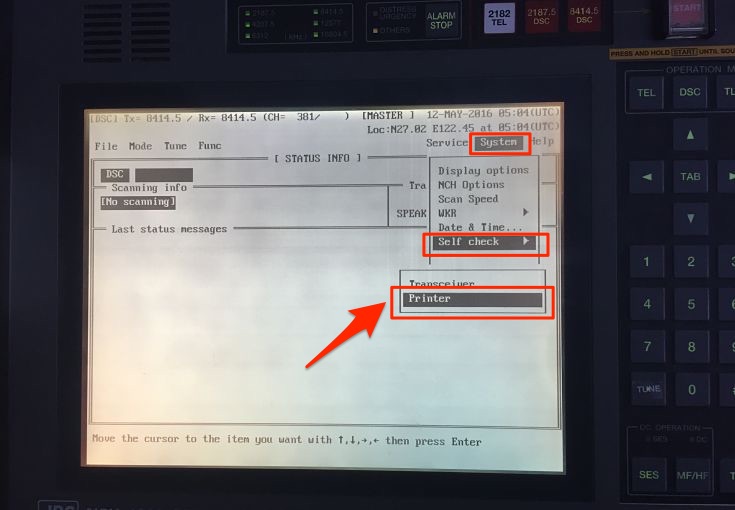
If the printer prints all the characters, printer test is pass.
Other Daily tests
As I said earlier, there can be other equipment specific daily tests and vessel should do these test as per Maker’s manual.
2. Weekly tests
Most of us think that weekly test is only DSC test with shore station. We must understand that DSC is only one mode of distress communication. We also need to test our R/T and NBDP every week. Lets see how we should do these weekly tests.
Weekly DSC test with coast station
Every week, we need to test the DSC operation with the coast station.
In Local Mode
- Go to Menu#1
- Choose option 11 (Test Call)
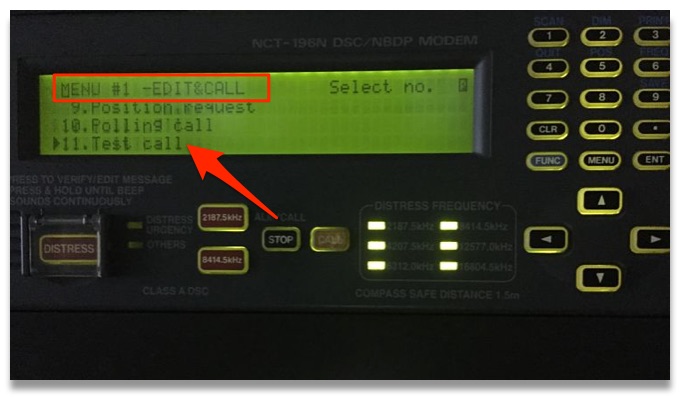
- Enter the Shore station ID
- Choose Telecommand -1 as “TEST” by side arrow
- Choose the Tx/Rx frequency and Press call
If doing this in remote mode
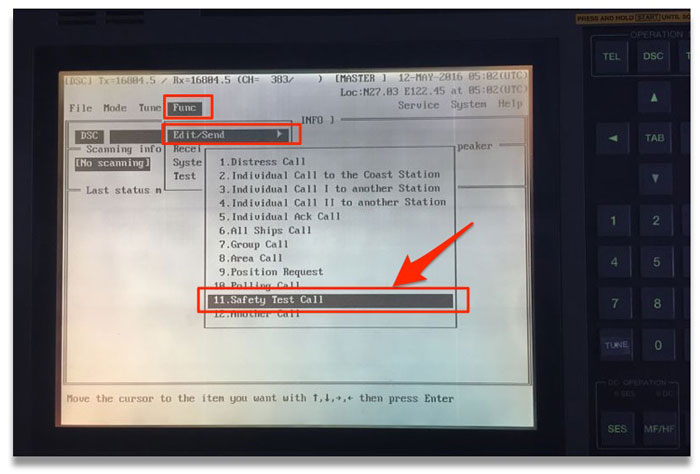
Go to FUNC -> Edit/Send -> Safety test Call and then edit the message if required.
On prompt to “transmit the call”, Choose option “yes”.
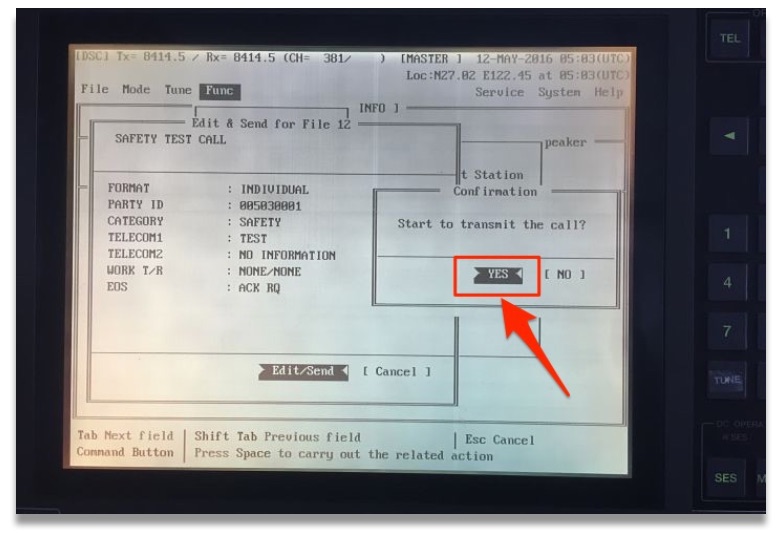
This will send the DSC test call to shore station. Test will pass if you receive the response back with “EOS” as “ACK BQ”.
It is important that these test calls are not made on 2 MHz frequency and are not made as an “all station” call.
What to do if you do not receive the acknowledgment from shore station ?
Well most of us would agree that this is common situation. And many of us leave it thinking that shore station is not answering. We fail to acknowledge that the problem could be with our equipment.
Some of us believe that filing the test with remarks “No response from shore station” is OK but it is not OK.
Another few has a file with “Typed message” similar to the test with shore response. They just take printout of this message to forge the record to show that the test was done. Whereas actually either it was not done or was done with no response from the shore.
It is very easy to catch if the record was forged or the test was actually done.
So here is how we should proceed in case we do not receive acknowledgment from shore station.
First try again with other stations and on other frequencies. If you are trying to send a DSC call to a nearby station on higher frequency, chance are that they will miss it. This is because, all frequencies has a blind spot near to the transmitter. Higher the frequency, larger is the blind spot distance.
Lets assume that with all your efforts, you still could not get the shore acknowledgment. Next you should try to test the DSC call with a ship station. Testing with ship station is similar to testing with coast station. We just need to change the ID to the ship’s MMSI number of the ship you are testing the DSC with. If possible we should do this ship to ship test on non-distress frequency.
If we still did not get the acknowledgment from the ship, ask the other ship if they received your test call. If they did receive, your transmitter if OK. If they did not receive your test call, expect problem with your transmitter.
Now ask the other ship to send you the test call. See if you can receive her test call. Try it on lower frequencies like 4 MHz. If you do not receive the other ship’s test call, your receiver is not OK.
Now that you know if the problem is with your receiver, transmitter or both, lets troubleshoot it further.
Problem with Transmission
If MF/HF is not transmitting, the JRC manual just ask to call for the service engineer. But there are few other things we can do to avoid this.
1) if you were able to test the DSC with ship but could not test with shore station.
Though this is acceptable sometimes but if your all the last few tests are with ship, it is not acceptable as this can be interpreted as a defect.
In this case transmission of MF/HF is OK, but the transmission power is greatly reduced. This is how you can proceed to solve this problem.
Check the output power setting
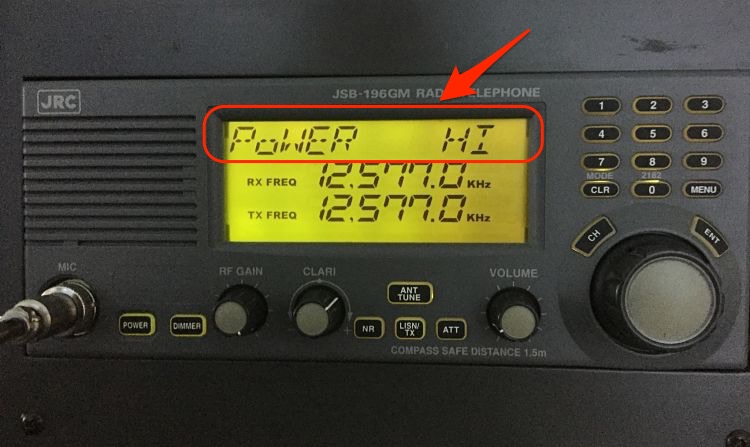
On some equipments you can change the power output to low and high. We need to make sure that the output power is set to high for testing. To do so on JRC,
Press Menu on the MF/HF controller -> scroll the dial to go to “Power” option -> set the power to High -> press Enter.
Check the Antenna
Even after setting the power to High, still you may not get acknowledgment from shore station. In this case first switch off the MF/HF equipment and clean the transmitting antenna. This Antenna is located on the Monkey island.
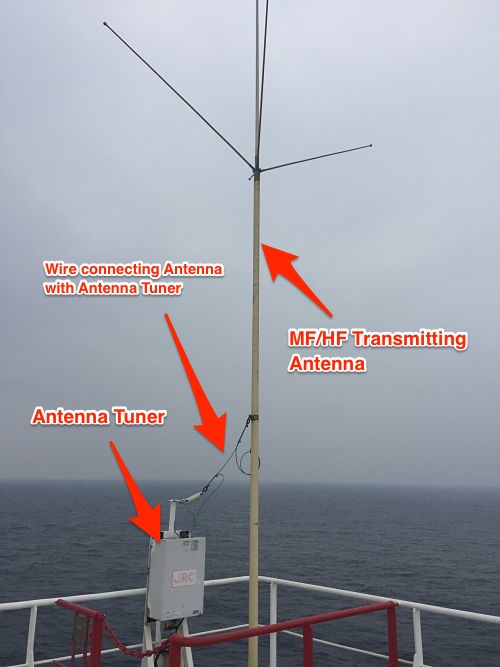
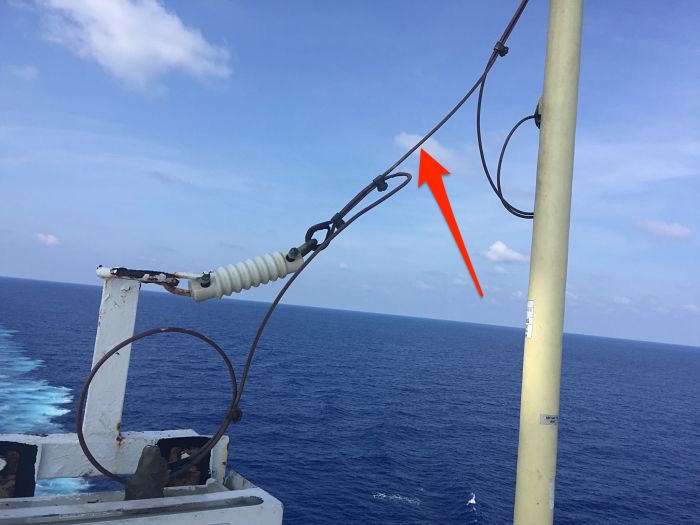
The transmitting antenna is connected with the antenna tuner. The connection between antenna and antenna tuner is with a copper wire. In most of the cases you will find this wire to be of green color which is not its original color.
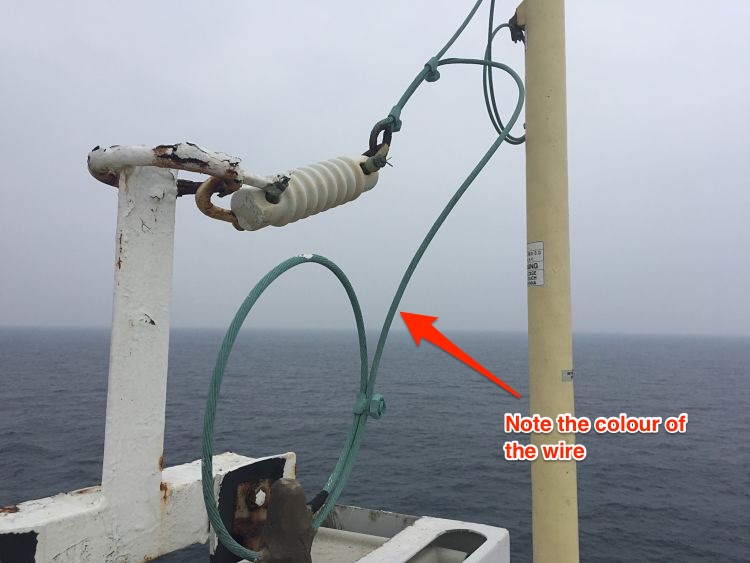
Remove this wire from all the connections and clean with emery paper to remove the green deposits. Do not put anything (grease, Varnish etc) on the wire after cleaning it. Connect the wire again and test the DSC with shore station. Most cases, you will be able to test with shore station.
2) If you did not get acknowledgment from ship station as well as shore station
If you were not able to get the acknowledgment from ship as well as shore station, check if the antenna is tuning. Different equipment has different ways to show if the antenna is tuned or not.
Some equipments shows message “Tune Not OK” on the screen. Others like JRC, will have the “TUNE” blinking on the screen. If you see any of these, tune the antenna, by pressing “ANT TUNE” button. If this does not tune your antenna, suspect problem with Antenna tuner.
Antenna tuner is either located in the wheel house or on the monkey island. If the tuner is on money island, and if the sealing of cover is not appropriate, there are chances of burnt PCB. Switch off & isolate the GMDSS station and open the cover of Antenna tuner. Check for any obvious burnt PCB signs.
If there are no visible signs, you need to communicate with maker highlighting the problem of antenna not tuning.
Problem with reception
If you have found the problem with the receiver, you can troubleshoot as follows
The first sign for a poor receiver is no sound on the MF/HF equipment. Tune into any R/T frequency and increase the volume. Do you hear any sounds ?
If you do not hear any sound, try adjusting RF gain.
If you still do not hear anything, MF/HF is not receiving anything.
Another way to know if your receiver is OK is to check the time signal. If you do not receive time signal from any stations, you can assume problem with your MF/HF receiver.
In case of poor receiver, you can check and clean the connection of the reception antenna. The MF/HF reception antenna is usually placed on the forward mast.
If you still do not get anything, most likely the problem lies in one of the PCB of the MF/HF receiver. You should communicate with the maker and if required request for their attendance.
R/T and NBDP weekly Test
Apart from DSC test, we also need to test if our R/T and NBDP are working as these also form part of the MF/HF equipment.
You can test the R/T with a ship station.
To test R/T, Switch to a non-Distress R/T frequency and talk to a passing ship. Follow same with the testing of NBDP. Switch to a non-distress NDBP frequency and communicate with a ship on NBDP.
Monthly Test
Monthly test of MF/HF equipment include the inspection of aerials and insulators. It is important that Electrical officer and 2nd mate check condition of aerials and insulators atleast every month. While checking the condition look for following
- Any broken aerial or insulator. If any insulator or aerial is broken, order it and replace it.
- Any salt deposits on the aerial. It is a good practice to clean the aerials with fresh water every month.
- Connections on the aerial are intact and clean. It is important that all the connection are clean, free of rust and other deposits. If these are not clean, it can reduce the transmission/receiving power of MF/HF drastically. We already discussed one example of this with the wire connecting aerial with the tuner.
Conclusion
MF/HF equipment is a very important part of GMDSS and bridge equipments. If a similar equipment was on board Titanic, it is possible that not a single person would have died.
Keeping this in a perfect shape is the responsibility of ship staff. Testing MF/HF regularly and religiously helps us achieve that. In case of unsuccessful test, we should find the reason for that and correct it.